The Ultimate Guide to the Mortgage Payment Calculator: Your Roadmap to Homeownership
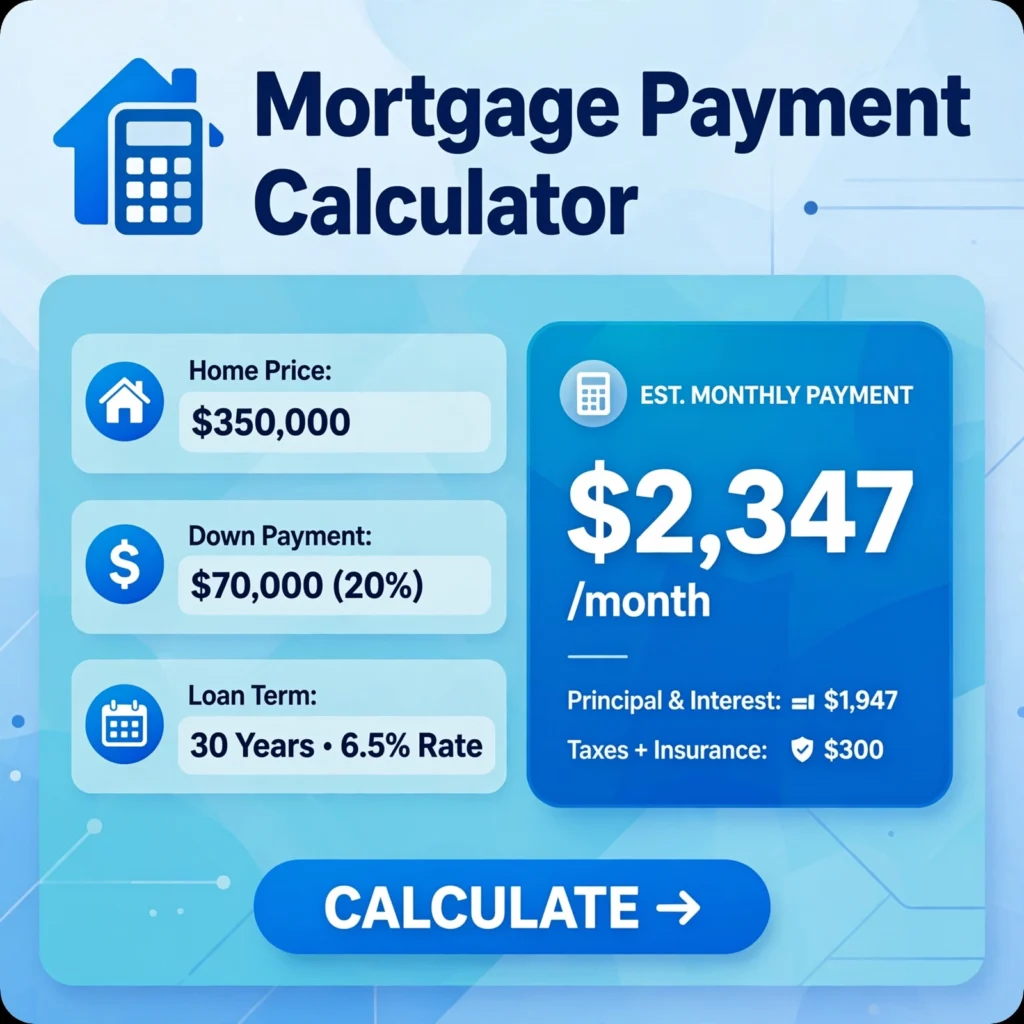
1. Introduction: Why You Need a Mortgage Payment Calculator Right Now
Buying a home is likely the biggest financial decision you will ever make. The excitement of viewing open houses and picking paint colors is wonderful, but the reality of the monthly payment can be terrifying if you don’t plan ahead.
This is where the Mortgage Payment Calculator becomes your best friend.
Think of this tool as your “financial crystal ball.” It doesn’t just tell you what your payment might be; it breaks down the exact dollars and cents. Whether you are a first-time buyer scrolling through Zillow or a seasoned investor looking at a rental property, a calculator removes the guesswork.
In this guide, we aren’t just going to tell you how to punch numbers into a box. We are going to teach you why those numbers matter, what the hidden fees are, and how to use this tool to negotiate a better deal with your lender.
2. The “Big Three”: What Goes Into Your Monthly Payment
Many people assume that their mortgage payment is just the “loan amount divided by months.” This is a massive misconception. If you use a Mortgage Payment Calculator, you will see that the total is made up of several distinct pieces.
Let’s break down the “PITI” – the acronym every homebuyer needs to know.
2.1 Principal & Interest (The Bank’s Cut)
This is the actual cost of borrowing the money.
- Principal is the amount you borrowed to buy the house.
- Interest is the fee the bank charges you for lending you that money.
When you make a payment, a portion goes toward paying down the loan balance (principal), and the rest goes to the bank as profit (interest). Early in your loan, you pay mostly interest; later, you pay mostly principal. Your calculator will show you exactly how this split looks.
2.2 Property Taxes (The Escrow Account)
This is the money you pay to your local government for schools, roads, and public services. Lenders usually collect a portion of your annual property tax with your monthly payment and hold it in an “escrow” account. They then pay the tax bill for you at the end of the year. This ensures that the government doesn’t put a lien on your home.
2.3 Homeowners Insurance (Protecting Your Asset)
This protects your home against fire, theft, or natural disasters. It is not optional. If you finance a home, the lender requires you to have it. Like property taxes, this is often bundled into your monthly mortgage payment and held in escrow.
2.4 PMI (Private Mortgage Insurance) – The Hidden Cost
If your down payment is less than 20%, lenders consider you a higher risk. To protect themselves, they require you to pay for Private Mortgage Insurance. This is not a benefit to you; it protects the bank if you default. A good calculator will automatically flag this if you input a low down payment. Warning: This can add hundreds of dollars to your monthly bill.
3. The Four Essential Inputs You Must Control
To get an accurate number from your Mortgage Payment Calculator, you need to have four key pieces of data. Here is how to get them right.
3.1 Loan Amount (The Price Tag)
This is the purchase price of the home minus your down payment.
Example: If the house is $300,000 and you put down $30,000, your loan amount is $270,000.
3.2 Interest Rate (The Cost of Borrowing)
This fluctuates daily based on the economy. Do not guess this! Use the current average mortgage rate for your credit score. If you have a credit score of 760+, you will get a lower rate than someone with a 620 score.
3.3 Loan Term (15 vs. 30 Years)
- 30-Year Fixed: Lower monthly payment, but you pay more interest over the life of the loan.
- 15-Year Fixed: Higher monthly payment, but you pay significantly less interest overall and build equity faster.
3.4 Down Payment (Your Skin in the Game)
The more you put down, the lower your monthly payment. Putting down 20% avoids PMI. Putting down 3% (like an FHA loan) might be easier to save for but will cost you more every month in PMI fees. Your calculator will help you visualize this trade-off.
4. Beyond the Basics: Advanced Features of a Good Calculator
If your calculator only gives you a “Principal and Interest” number, it is doing you a disservice. A robust Mortgage Payment Calculator will include the following features:
4.1 Property Tax and Insurance Estimators
Most good tools will let you input the annual tax amount and insurance cost. The calculator then divides these by 12 and adds them to your monthly bill.
4.2 HOA Dues (The Community Fee)
If you buy a condo or a home in a planned community, you will have Homeowners Association dues. These cover community maintenance, pools, and landscaping. Add this to your calculator, because HOA fees have risen sharply in recent years, and they are not optional.
4.3 Amortization Schedules (Seeing Your Equity Grow)
This is the most empowering feature. An amortization schedule shows you a table of every single payment you will make over 30 years. It shows:
- The exact interest you pay each month.
- How much principal you are paying off.
- How much equity you have built over time.
Looking at this graph often motivates people to make extra principal payments to save money on interest long-term.
5. How to Use the Calculator to Set a Realistic Budget
The calculator isn’t just for “looking”; it is for “planning.” Here is how to use it to decide how much house you can actually afford.
Step 1: The 28% Rule (The Golden Guideline)
Financial experts suggest that your total housing payment (PITI) should not exceed 28% of your gross monthly income. If you bring home $8,000 a month before taxes, your total mortgage payment should not exceed $2,240.
Step 2: The “Stress Test” (Can you afford a rate hike?)
Interest rates are volatile. Use the calculator to see what your payment would be if the interest rate went up by 1% or 2%. If you can still afford that higher payment comfortably, you are in a safe position.
Step 3: The “Rent vs. Buy” Toggle
Some advanced calculators have a “Rent vs. Buy” feature. This shows you the total cost of renting a comparable apartment for 5 years versus buying the home. It factors in property appreciation and tax benefits, giving you the “break-even” point—the number of years you need to stay in the home to make buying worthwhile.
6. Common Mistakes People Make When Using Mortgage Calculators
I have seen countless buyers get excited about a house, only to be crushed when they get the actual paperwork. Here are the traps to avoid:
Mistake 1: Forgetting to include the “Total Monthly Cost”
Many people look at the “Principal & Interest” box and say, “Yes, I can afford $1,500!” But they forget to add taxes ($400), insurance ($100), and PMI ($150). Suddenly, that dream payment is $2,150. Always look at the “Total Monthly Payment” line at the bottom.
Mistake 2: Overlooking PMI with a low down payment
The calculator will often assume you are putting 20% down. If you are a first-time buyer putting down 5%, make sure you check the box or input the correct down payment percentage. If the calculator doesn’t add PMI, your result is lying to you.
Mistake 3: Guessing the interest rate
I see people plug in “3%” when the current market rate is “6.5%.” This gives them a false sense of security. Always check sites like Bankrate or the Federal Reserve to see what the current average rate is for your credit score.
7. The “What If” Scenario: How to Play with the Numbers
The magic of a Mortgage Payment Calculator is that it allows you to run “scenarios” instantly.
- Scenario A: You buy the house with a 5% down payment. The monthly payment is $2,000.
- Scenario B: You wait six months, save more money, and put down 10%. The payment drops to $1,850 (because you avoid some PMI).
Actionable Tip: If you are working with a real estate agent, ask them: “If I offer $10,000 over asking price, what does that do to my monthly payment?” Use the calculator to run that number. It takes two seconds, and it ensures you don’t overpay for a home just to “win” the bidding war.
8. Conclusion: Taking the Next Step Toward Your New Home
The Mortgage Payment Calculator is more than just a math tool; it is a blueprint for your financial future. By understanding PITI (Principal, Interest, Taxes, and Insurance), adjusting for PMI, and running different interest rate scenarios, you are taking control of your finances.
Don’t let the fear of the numbers stop you from buying. Let the numbers inform you. Before you start your house hunt, sit down with your partner or family, open up a calculator, and decide on a monthly payment that allows you to live comfortably, travel, and save for retirement.
Once you have that “magic number” in mind, you can search for homes with confidence.
Ready to calculate your future? Grab your loan estimate, plug in the numbers, and take the first step toward walking through the front door of your very own home.